

Keep projects profitable
Link related cost information with potential change orders to update project managers and accounting personnel to ensure your work is completed and costs are tracked.
Accurate change order tracking
Get instant visibility of where a change order started and the reporting of how it affects your job cost.
See what HCSS can do for you
Schedule a demo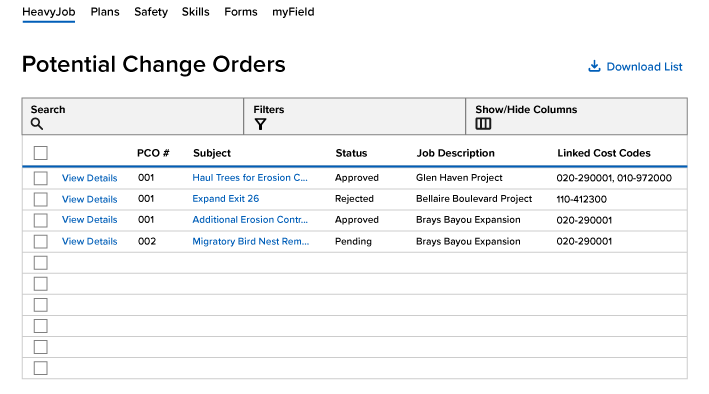
Ask our customers why they trust HeavyJob for change order tracking





The software really helps us with efficiency.
- Aaron Parker, Silver Star Construction
It puts all the tools I need at my fingertips.
- Kyle Morgan, Diamond Materials
95%
of HeavyJob projects close within budget
128,000
active HeavyJob users
9.4/10
average user rating
Always-on support.
Always human.
- Guided implementation to get your team up and running faster.
- Award-winning 24/7/365 support from our Sugar Land, TX office.
- Dedicated Customer Success rep to guide you beyond go-live.
- Ongoing training through HCSS Academy and HCSS community.
See how to collect better field data with less effort and instant insight
Step 1
Share your business headaches
After submitting a demo request form, an HCSS expert will follow up with you by the end of the next business day to discuss your business needs and requirements.
Step 2
See HCSS in action
Then, we’ll walk you through a demo tailored to specific HCSS solutions that can help solve your current business problems.
Step 3
Get up and running in days
Finally, you’ll be assigned a dedicated implementation specialist who will manage your implementation from start to finish and ensure project completion.
Frequently asked questions
What is construction change order tracking software?
Construction change order tracking software helps contractors manage and track changes to the original scope of work on a project.
Change orders capture additional work caused by design changes, site conditions, or owner requests—ensuring those changes are documented, tracked, and accounted for in project costs and billing.
How does change order tracking work in construction?
Change order tracking works by capturing potential changes as they occur and managing them through review, approval, and billing.
With HeavyJob, teams can create potential change orders (PCOs), track their status, and link them to related RFIs, cost codes, and project impacts. This ensures every change is documented and visible from initial issue through final approval and billing.
How do change orders help protect project profitability?
Change orders help protect project profitability by ensuring all out-of-scope work is tracked and billed.
With HeavyJob, teams can capture cost and schedule impacts as changes happen, helping ensure additional work is properly documented and paid—rather than absorbed as lost margin.
How do change orders help prevent cost overruns?
Change orders help prevent cost overruns by tracking how scope changes impact the project budget in real time.
With HeavyJob, teams can link change orders to cost codes and job costs, giving immediate visibility into how changes affect the overall financial performance of the job.
How do change orders improve communication and documentation?
Change orders improve communication by providing a structured, documented process for managing scope changes across project teams.
With HeavyJob, all change-related information—including scope, cost impact, and approvals—is stored in one place, ensuring clear communication and a complete record of decisions.
How do change orders connect to RFIs, job costing, and billing?
Change orders connect directly to RFIs, job costing, and billing, making them a key part of the overall project workflow.
With HeavyJob, issues identified in the field or through RFIs can be turned into change orders, tracked against job costs, and ultimately billed—ensuring every change is accounted for from start to finish.
Didn’t get all of your questions answered?
Request info