

Trusted by 4,000+ contractors of every size






One platform for real-time project visibility

Track progress against the budget
View estimator notes, identify items over budget, and create custom reports to improve project performance.

Connect the office to the field
Capture time cards, site conditions, photos, and job progress to give project managers and executives insight into every project.

Improve cash flow
Bill faster for your crews’ work and reduce billing disputes with easy-to-find documentation for every project.
- Time cards
- Job costing
- RFIs
- Submittals
- Change order
- Export to payroll
- Budget & forecasting
- Material tracking
- Map view
- Field productivity
- T&M billing
- Daily log
- Construction forms
- Utility work
Time cards
A digital solution to track overtime and regular hours for each crew member.

Job costing
Get instant insight into job costs and production rates to identify cost codes trending over budget.

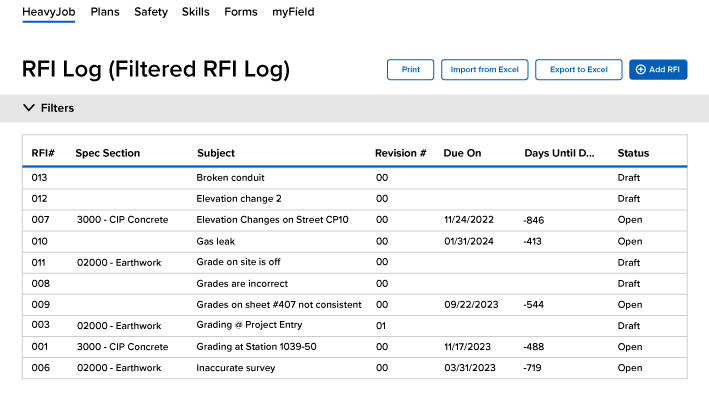
RFIs
Simplify the RFI process to keep projects running smoothly and on schedule by ensuring your crews have the information they need to complete the job.
Submittals
Track the submittal status, type, and due date for every project, and who you are waiting on with the ball-in-court workflow.

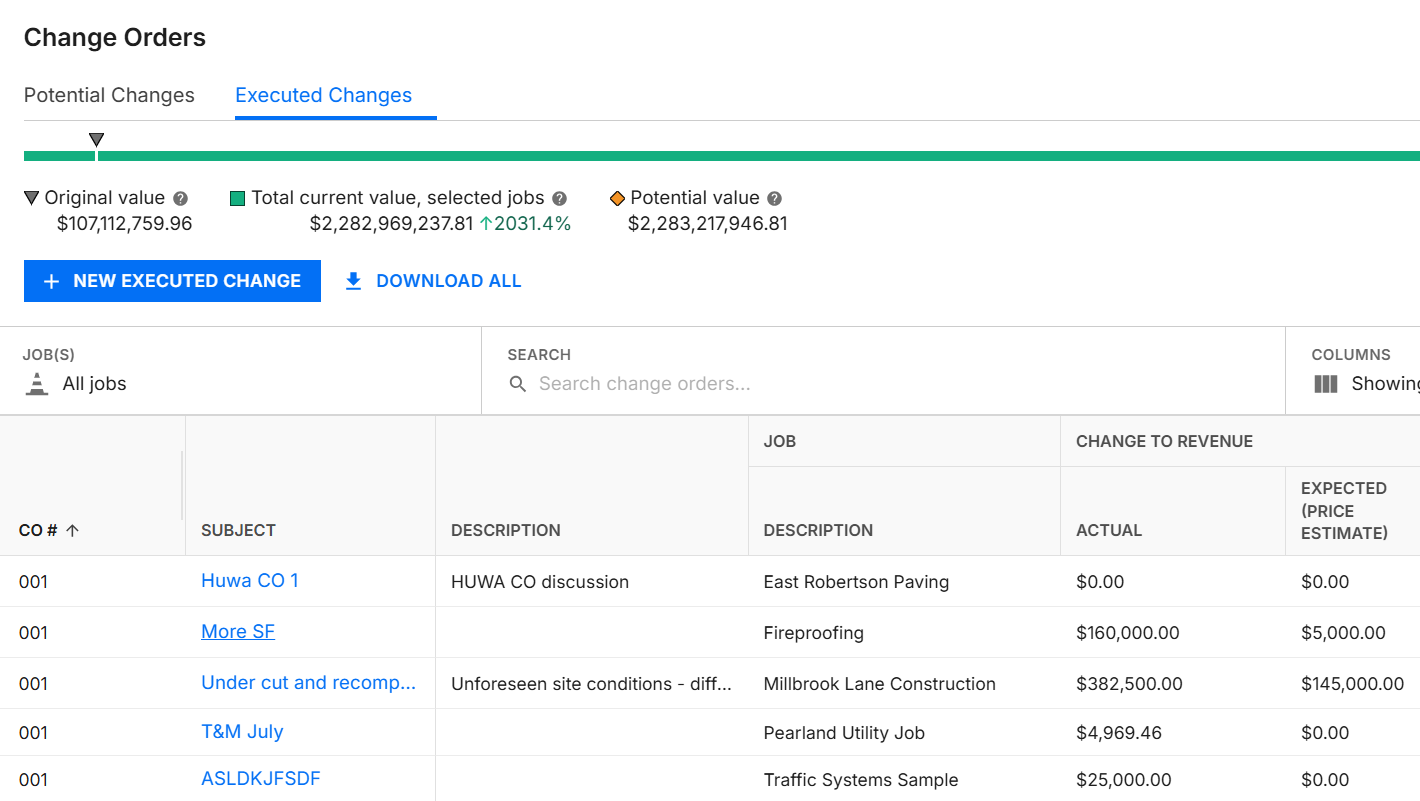
Change Orders
Track potential change orders (PCOs) in real time as they occur on the jobsite and link them to related cost codes.
Export to payroll
Export approved HeavyJob time cards to your payroll or accounting system to reduce double entry and streamline payroll processing.

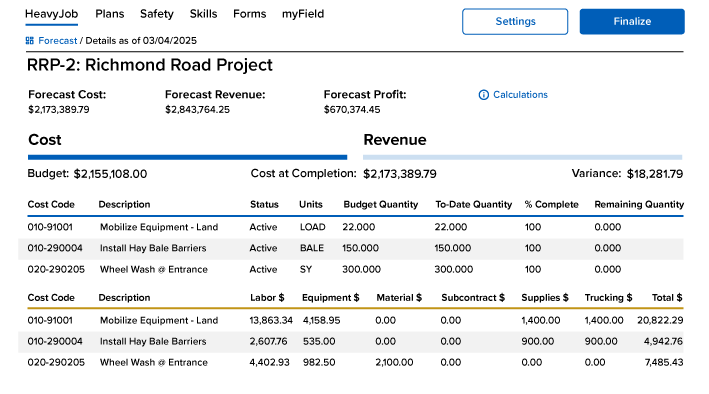
Budget & forecasting
Use project data to forecast what will happen next so you can make informed decisions.
Material tracking
Quantity tracking tied to worker productivity and equipment utilization.

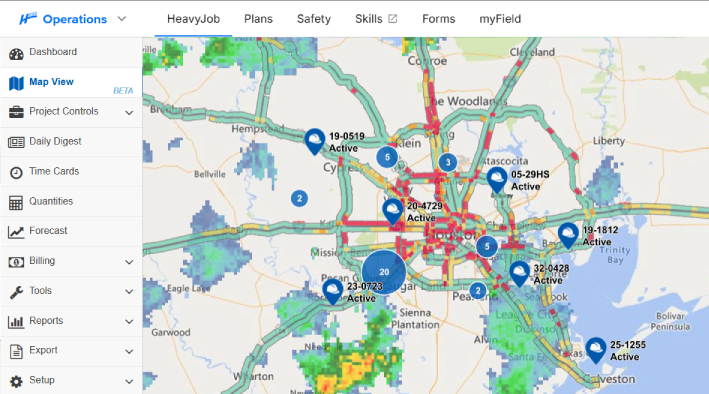
Map view
Visualize your job data to spot trends and quickly see what needs your attention.
Field productivity
Give the foreman access to the data needed so that changes can be made immediately in the field.

T&M billing
Easily track all work billed at T&M rates to maximize revenue.

Daily log
Easy management review of all daily activities, photos, and progress.

Construction forms
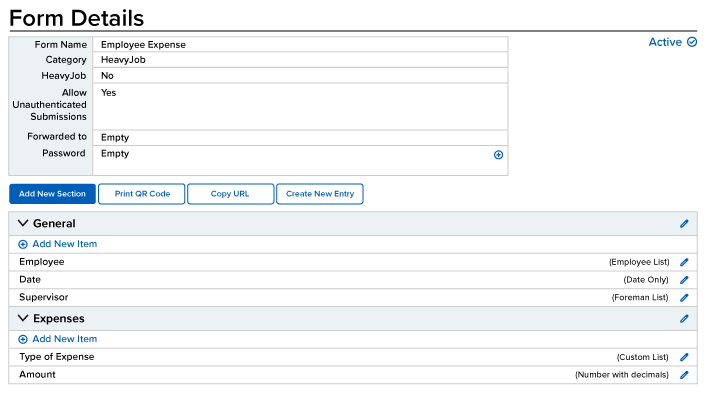
Take your paper forms digital and build fully customized forms that document the details you need while meeting internal and external requirements.
Utility work
Get paid faster on utility jobs by capturing pay items and supporting documentation on every work order. Bulk import work orders to get crews in the field sooner, then use customizable daily field reports to document completed work and collect sign-off from inspectors or owner reps.

It makes the job easier for the foremen.
- Mike Fontello, Diamond Materials
It lets me know where projects are and where problems might be.
- Tim Klass, Sigfusson Northern Ltd.
95%
of HeavyJob projects close within budget
128,000
active HeavyJob users
9.4/10
average user rating
Seamless accounting integrations
Connect the tools you already use. Your data flows accurately from HeavyJob to accounting and payroll apps like Sage, ViewPoint, QuickBooks, and more to save you time and reduce errors.
View list of systemsAlways-on support.
Always human.
- Guided implementation to get your team up and running faster.
- Award-winning 24/7/365 support from our Sugar Land, TX office.
- Dedicated Customer Success rep to guide you beyond go-live.
- Ongoing training through HCSS Academy and HCSS community.
Foremen productivity calculator
* Based on a recent survey showing companies saved approximately 3 hours per week per foreman
What to expect from demo to go-live
Step 1
Share your business headaches
After submitting a demo request form, an HCSS expert will follow up with you by the end of the next business day to discuss your business needs and requirements.
Step 2
See HCSS in action
Then, we’ll walk you through a demo tailored to specific HCSS solutions that can help solve your current business problems.
Step 3
Get up and running in days
Finally, you’ll be assigned a dedicated implementation specialist who will manage your implementation from start to finish and ensure project completion.
It’s all about good field data.
Request a demo


Frequently asked questions
How does HeavyJob improve project management and job performance compared to spreadsheets or manual processes?
HeavyJob improves project management by replacing spreadsheets, paper processes, and disconnected tools with a single source of truth.
Instead of relying on manual entry and delayed reporting, field crews capture time, production, and documentation directly from the jobsite, giving project managers immediate visibility into performance, costs, and issues.
By connecting field data to the office in real time, HeavyJob reduces errors, improves coordination, and helps teams make faster, more informed decisions across the entire project.
Who is HeavyJob designed for?
HeavyJob is designed for self-performing civil, infrastructure, and utility contractors who need real-time visibility into how their jobs are performing.
In the field, crews and foremen use it to easily capture accurate data as work happens, like time cards, quantities, and safety forms, so nothing gets missed or delayed.
Back in the office, project managers and operations teams use that same data to track costs, productivity, and profitability across projects. Accounting and payroll teams can export it directly into their systems, eliminating double entry and reducing errors.
It also helps close the loop across the business. Estimators get real production data back into HeavyBid to improve the accuracy of future bids, and project managers can more easily document T&M work and change orders, helping speed up invoicing and improve cash flow.
How does HeavyJob connect field data to real-time project performance?
In the field, foremen use mobile devices to enter time cards, track quantities, and document work as it happens. That data flows instantly to the office, where project managers can see up-to-date job costs, productivity, and performance against budget.
This real-time connection helps teams identify issues early, adjust while work is still in progress, and make better decisions before small problems turn into costly overruns.
How do crews use HeavyJob in the field?
HeavyJob is built for the field, allowing crews to enter time cards, track production, complete daily logs, and report issues directly from their mobile devices.
It works with or without an internet connection, so crews can capture data as work happens and sync it later when they’re back in service. This ensures accurate information is captured at the source—without relying on paper, memory, or end-of-day reporting.
How does HeavyJob help improve project profitability?
HeavyJob helps improve project profitability by giving teams visibility into costs, productivity, and overall job performance as work happens.
Accurate time cards and production tracking feed directly into job costing, so teams can see how work is tracking against budget and identify issues early—while there’s still time to adjust.
Teams can then use budget forecasting to project outcomes and make proactive decisions, while time and material billing ensures all completed work is accurately captured and invoiced—helping protect margins and improve cash flow.
What's the difference between the HeavyJob app and the myField app?
HeavyJob and myField are complementary mobile apps designed for different roles on the jobsite.
The HeavyJob mobile app is primarily used by foremen and supervisors to manage crew time cards, track production, and document daily jobsite activities.
The myField app is designed for individual employees to clock in and out, review their hours, and access their work schedules.
Both connect with HeavyJob, helping contractors manage labor information across crews and individual employees.
How does HeavyJob support payroll and integrate with accounting systems?
HeavyJob supports payroll and accounting by eliminating double entry and ensuring accurate labor data flows directly from the field to your financial systems.
Time cards captured in HeavyJob can be exported to accounting and payroll systems, reducing errors, saving time, and ensuring your financial records match what’s happening on the job.
How long does implementation take?
Most HeavyJob customers are fully operational within 90 days depending on company size and rollout scope.
Throughout implementation, the HCSS Professional Services team provides hands-on guidance and regular check-ins to ensure a smooth rollout and a quick time-to-value.
Didn’t get all of your questions answered?
Request infoCurious if HeavyJob is the right fit for your business?
Chat with us to see the software in action!
Once you fill out the form, we’ll connect with you to answer your questions and help you decide if HCSS is the right software for you. Then, we’ll create a personalized demo tailored to your needs to show how HeavyJob can help solve your most pressing business problems around construction management.
